If you’ve been job hunting for more than a week, you’ve heard it: “make sure you have an ATS-friendly CV, or a robot will bin it before a human ever sees it.” It’s repeated so often that it’s become job-search folklore — and like most folklore, it’s part true and mostly exaggerated.
Here’s the straight version. An ATS (applicant tracking system) is software recruiters use to collect, store, and search applications — not, in most cases, to auto-reject you on sight. What it does do is try to read your CV and pull out structured information: your name, your job titles, your dates, your skills. If your layout confuses that process, the recruiter searching their database for “marketing manager, 5 years” may never find you — not because a robot judged you, but because your experience never made it into the record correctly in the first place.
That distinction matters, because it changes what you’re actually optimising for. You’re not trying to trick a robot. You’re making sure the robot can read what’s already true about you.
What an ATS-Friendly CV Actually Means
At its core, being ATS-friendly means your CV parses the way you intended it to — the software extracts your name as your name, your job titles as job titles, and your skills as skills, in the right order, attached to the right dates.
Most modern applicant tracking systems are genuinely decent at this for straightforward layouts. The problem isn’t that ATS software is dumb — it’s that a lot of “creative” CV formatting was never designed with parsing in mind, because it was designed to look good to a human eye first.
According to Jobscan’s research on ATS formatting, which draws on a survey of hundreds of recruiters, the vast majority of recruiters now use some form of ATS to manage applications — which is exactly why this is worth thirty minutes of your time rather than something to panic about.
The layout choices that actually cause problems
This is the part most advice gets vague on, so here’s what specifically trips up parsing, based on how these systems are built to read a document from top to bottom, left to right:
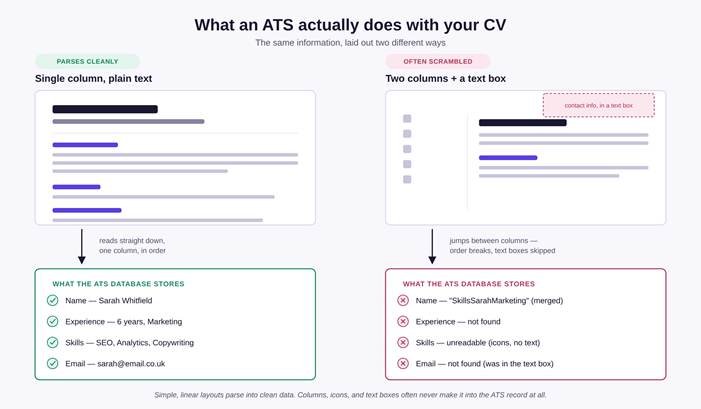
Multi-column layouts. If your CV has two columns — say, a skills sidebar next to your main experience — an ATS often reads straight across the page rather than down one column at a time. Line one of your left column gets glued to line one of your right column. Your neat two-column design becomes a garbled sentence in the system’s database.
Text boxes. Many parsers skip content inside text boxes and floating design elements entirely — which is a real problem if your name or contact details live inside one, because that’s exactly where CVs commonly put them for visual effect.
Headers and footers. The same applies here: content placed in a document header or footer (again, often contact information) is frequently invisible to the parser, even though it’s the first thing a human eye sees.
Icons instead of text. A little phone icon next to your number looks clean. To an ATS, it’s often just an image — the number next to it is fine, but if your section headings (“Skills,” “Experience”) are represented as icons or graphics rather than actual text, the system may not recognise them as headings at all.
Unusual fonts. If a font isn’t standard or properly embedded, parsers can substitute the wrong characters for it — turning readable text into garbled symbols.
Tables used for layout. Tables built to visually organise a CV (rather than genuinely tabular data) tend to confuse reading order the same way columns do.
Inconsistent date formats. Dates like “Jan ’21–Mar ’23” can trip up systems trying to calculate your total experience automatically. Full, consistent formats (e.g. “January 2021 – March 2023”) parse far more reliably.
The image below shows the practical difference: the same information, laid out two ways, and what actually reaches the ATS database in each case.
How to check if your own CV is ATS-friendly
You don’t need special software for the first pass — a few honest checks will tell you most of what you need to know.
1. The copy-paste test. Select all the text in your CV and paste it into a plain text editor (Notepad, TextEdit, or even a blank email). If your section headings, job titles, and dates still appear in a sensible order — great sign. If everything runs together in a jumbled block, that’s roughly what an ATS is seeing too.
2. Check where your contact details actually live. Open your CV and check: is your name and phone number typed directly into the body of the document, or sitting inside a header, footer, or a separate text box or design element? If it’s the latter, move it into the main body.
3. Count your columns. If your CV uses a sidebar or multi-column layout for anything beyond a simple footer, consider whether that content would survive being read straight across the page rather than down each column.
4. Look for icon-only headings. If “Skills” or “Experience” appears only as a small graphic rather than as typed text, add the word itself alongside it, even in a small font.
5. Save it as a text-based PDF (not a scanned image), or a plain .docx. Both are generally safe formats, provided the layout inside follows the rules above — the file type matters far less than what’s actually inside it.
If you’d rather not run these checks yourself, this is exactly the kind of thing we build in from the start when writing a CV — every CV we produce is checked against parsing behaviour before a client ever sees the final draft, alongside the human judgement of what actually reads well to a hiring manager. You can see how that process works on our CV writing services page (/cv-writing-services), or, if you already have a CV and just want the formatting reviewed and cleaned up, our CV formatting service (/cv-formatting-services) is built specifically for that.
The quick checklist
☐ Single-column layout (or a sidebar limited to non-essential content)
☐ Name, phone number, and email typed directly in the body — not in a header, footer, or text box
☐ Section headings are real text, not icons or images
☐ Standard font (Arial, Calibri, Georgia — nothing decorative)
☐ Dates written in full and consistently
☐ Saved as a text-based PDF or .docx, not a scanned image
☐ Passed the copy-paste test above
A few honest FAQs
Does a “pretty” CV design always fail ATS checks?
Not necessarily — plenty of well-designed CVs use a single-column layout with tasteful use of colour and typography, and parse just fine. It’s specifically columns, text boxes, headers/footers, and icon-only labels that cause the real problems, not visual polish itself.
Will an ATS auto-reject me if my formatting is imperfect?
Usually not automatically. What typically happens is your information is captured incompletely or in the wrong fields — which means a recruiter searching their database later may not find you, even though you were a genuinely strong match. The damage is usually invisible rather than dramatic.
Should I use the exact keywords from the job description?
Where they’re honestly true of your experience, yes — both for search-ability in the ATS and because it’s simply good practice to mirror the language of the role you’re applying for. It’s not a trick; it’s making sure your real experience is described in the same terms the recruiter is searching for.
If you want a second pair of eyes on your current CV — formatting, keywords, and the actual writing — our team has been doing exactly this for over 15 years and 6,000+ CVs a year. Take a look at our CV writing packages (/packages) to see where to start.
[…] For more guidance on structure and formatting, read our related article, ATS-Friendly CV: What It Actually Means and How to Check Yours. […]